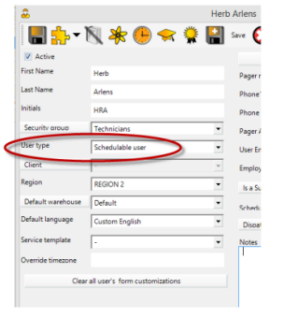
Your AyaNova consists of two aspects:
How many scheduleable resources can be scheduled and what optional add-ons may be used are determined by what licenses are set within your AyaNova database.
Your database holds the licensing, along with your data.
How to determine which level of scheduleable resources licenses to purchase:
What is provided when licenses are purchased:
Let us help you confirm which licenses you need - contact us that you would like recommendations on what to purchase - provide in your message how many technicians/engineers, what tasks you need to accomplish, and flow of your day to day service!
Your optional add-on license entitles your company to install and use and receive support for the latest version of that optional add-on during the year of your subscription.
Don't forget - to be able to successfully run, your optional add-ons installation NEED to be the same version as your main AyaNova program installation.
Renewals/cancelations:
Prior to the expiration of one year, our payment processing provider, will email you a notification reminder that your optional add-on subscription will be automatically renewed. The notification will include a link if you need to log in to make changes to your payment method or to your registered email address or if you would like to cancel your subscription.
If you do not renew an optional add-on you will no longer be eligible to receive support nor install new updates for that optional add-on.
It is normally expected that if a company renews their AyaNova subscription but cancels an optional add-on subscription, that they no longer are using and have uninstalled that optional add-on. A company "could" keep using a previously subscribed but now expired optional add-on IF their AyaNova itself continues at the exact same older version as that of the expired optional add-on program. We recommend installing the latest version to get the benefit of bug fixes and new and expanded features and the support that comes with the latest version.
Licensing is based on the number of "resources" you want to schedule - i.e. an actual person (i.e. a technician), a truck, a group of people (i.e. a department), or a bus - whatever/whoever you want to schedule and track in AyaNova.
Your AyaNova database does not require licenses for those that enter and view data only (are not scheduled) nor does your AyaNova database require licensing based on the number of networked computers that access your database.
Licensing for AyaNova is not based on the number of people that will be running the program, nor is it based on the number of computers on a network that all connect to the same AyaNova database. Licensing is based on the number of "resources" you want to schedule - whether those resources be an actual person or a truck or a group of people
Subscription prices do not include your applicable taxes.
Your level of resource licenses includes support and updates for first 12 months:
Your optional add-on license includes support and updates for first 12 months:
Subscription renewals will be automatically renewed at 35% of the initial subscription license price.
Prices, licensing and support policies are subject to change.
We make every effort to keep our price per license as low as possible so that AyaNova can be affordable to organizations and business of all sizes. Our unique licensing program means that AyaNova is just as affordable for a small business as a larger organization.
If your organization is a registered charitable organization we would be pleased to provide discounted pricing of up to 50% off our regular affordable license price..
To receive a discount, contact us with your official government issued proof of charitable status for details, as well as include your web site. Charitable organizations do not include schools, other education facilities, nor other government funded facilities.
To save yourself time, we recommend evaluating in this order:
Quickly get a feel for the features and determine if AyaNova looks like it might be a match for your organization by installing AyaNova in single user mode first on one computer
Then if AyaNova looks like it might work for your organization:
Software subscription licenses purchased are considered opened at the time of purchase and are not refundable.
Congratulations on your business growth! We would be pleased to provide you with a coupon code to discount the new level moving to that replaces your original level!
Before purchasing contact us with:
Discounts can not be applied after purchase. Be sure to contact us to obtain your discount before your purchase.
Once the new subscription is purchased with the discount coupon we provide to you, we will cancel your original subscription for you.
Our license agreement permits only one database file per unique activation key. What this means is that you are not permitted to apply your key to more than one AyaNova database.
If you have more than one AyaNova database (i.e. each division of your company wants to have a separate AyaNova database), purchase subscription license(s) for each database separately using a unique company name.
Example : Your company SNOW Inc. has two offices - one located in Canada, one located in the US.
We highly recommend upgrading to the latest AyaNova.
For those that prefer to continue with an older version of AyaNova, you can certainly purchase additional older licenses and continue to use as is without further email support, updates or upgrades.
Contact us from your registered email address, provide the following, and we will send the specific URLs so that you can purchase:
For additional licenses for AyaNova version 3.x, 4.x, 5.x or 6.x:
For additional licenses for your AyaNova CE 1.9:
No. Once your payment is processed, the email address you provided in your order will be sent via email an Activation Key.
This Activation Key will include instructions how to fetch and apply the included keycode that will activate the AyaNova database that you have already installed and tried out for the resources subscription license you have purchased
You do not have to install any new software nor make any new configurations
The Activation Key will have an Install By date which will be one month from date of purchase - for example, if you purchased October 5th, the Install By date will be midnight November 4th (November 4 12:00AM). The key must be applied before this date. A request for re-issue of a keycode may require an Administration Fee of US$35.00 to cover re-processing fees.
Note that once a keycode is applied, your licenses are now maintained in your database along with your data.
In a network configuration, all computers access the same licensed database, so there is no need to re-apply the keycode other than initially to license the database. Refer to the AyaNova Help section on network configuration.
In the event of a need to re-install, you would restore the database from backup which would restore your data as well as the license. Please refer to the AyaNova online Help documentation on backup and restoration; or contact us if any questions.
Your AyaNova license key email message will be emailed from our standard correspondance email address support@ayanova.com, to the registered email address you provided in your order once payment has been successfully processed and received.
Check your Spam/Junk folder as well as make sure that your email server and email security program(s) allows all email from support@ayanova.com.
You will receive an email notification from our payment processing provider, when your payment has been successfully processed.
The email notification will say your Activation Key email may take 48 hours to receive. This time frame to receive your key may only occur if your purchase is processed after business hours, on a weekend or during a holiday or observance. License key emails are sent out during regular support hours Monday through Friday 9AM to 5PM PST excluding holidays and observances, and are usually sent out within the hour or less of payment being processed.
If you made a payment via credit card, it is possible there may be a delay in processing due to fraud prevention measures, particularly if any of the information entered doesn't match with the credit card such as address etc.
Personal technical support is available to anyone trialing AyaNova, or licensed companies with a current support & update subscription.
Support is provided from North America based certified network and PC support technicians.
Technical support options:
Localization / Text displayed in the program - AyaNova interface text is fully customizable as a built in feature to support industry or company specific terminology or alternative languages. And you can also add custom fields to many of the entry screens. AyaNova comes pre-localized for the following languages: English, Spanish, French and German.
Report Templates - customizations and support for report template design is considered outside of the regular AyaNova support. A charge to provide report template support may occur. We provide many example report templates with the installed AyaNova program, as well as additional examples and details on the AyaNova Support Forum, as well as the tutorials in the AyaNova Online Help on report template design. If you would like a custom report template designed, or a specific aspect of an existing report template changed, please refer to the AyaNova Support Forum topic on custom report template design for what to send us so that we can provide you with a quote. Minimum charge of US$55.00 with total cost depending on what is involved.
Program customizations - Although we do not customize the AyaNova program itself for individual companies, if interested in a custom plug-in or add-on for AyaNova, just contact us at support@ayanova.com and let us know what you are looking for and what you need it for. We might already have the feature in AyaNova; or can provide you with a quote to develop a custom plug-in if possible; or your suggestion may already be on our Wish List as a possible future feature.
New feature requests - We are always interested in hearing suggestions for new features and how you would use. AyaNova has grown over the years due to suggestions from you! Suggestions to date can also be found on the Wish List on our AyaNova Support Forum.
Develop your own options - If you are a developer yourself, do check out the API/Development section of the AyaNova Support Forum; as well as the AyaScript developers plugin.
If your support subscription is current, there are no additional charges to upgrade within the same major release version (i.e. any 7.x.x version). New major releases will require a new (discounted from regular price) subscription (i.e. 7.x to 8.x):
If your company does not have a current active support subscription, you will need to purchase subscription(s) and then can perform the upgrade:
 AyaNova