Bing

We offer many additional plug-ins for AyaNova


Interface with Outlook

With OLI, right from within Outlook itself you can:

  • Generate an AyaNova service workorders from an Outlook email
  • Generate an AyaNova schedule marker from an Outlook email
  • Import AyaNova clients/vendors/head offices into Outlook as contacts
  • Export Outlook contacts into AyaNova as either clients vendors or head offices
  • Import your AyaNova scheduled items into Outlook
Generate an AyaNova service work order directly from within Outlook itself

You only need to purchase one OLI license at $149.00 for your database regardless of the number of your AyaNova users that will use this optional add-on plug-in.

Download the OLI setup file from the Downloads web page

More details on use of the OLI plug-in in the AyaNova Online Help


Outlook Schedule Export

Example image of AyaNova scheduled items imported into your OutlookCalendar

The Outlook Schedule Export plug-in with one click from within AyaNova exports your scheduled workorder items and schedule markers into an Outlook calendar

You only need to purchase one $39.00 license for your database regardless of the number of your AyaNova users that will use this optional add-on plug-in

Download the Outlook Schedule setup file from the Downloads web page

More details on use of the Outlook Schedule Export plug-in in the AyaNova Online Help


Quick Notifications

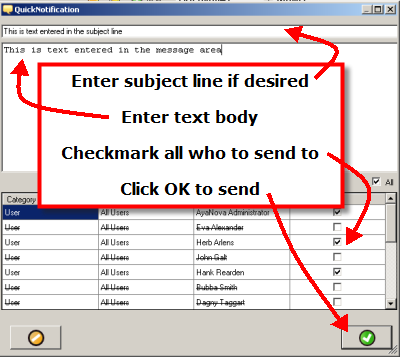
Example image of sending a quick notification to AyaNova users

The Quick Notification plug-in is very useful if you want to quickly send a message to one or more of your AyaNova users

The quick message can be sent via external email, external SMS, or via AyaNova internal memo or AyaNova internal popup.

You only need to purchase one $29.00 license for your database regardless of the number of your AyaNova users that will use this optional add-on plug-in

Download the Quick Notification setup file from the Downloads web page

More details on use of the Quick Notification plug-in in the AyaNova Online Help


Export to XLS

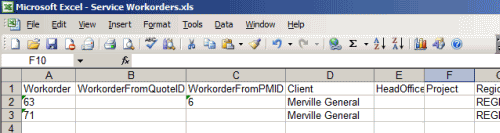
Example image of xls file made from exporting service workorder records to XLS

The Export to XLS plug-in is very useful to easily export record data to an xls file for additional business analysis, import into other software, etc

There is no need to have Excel or OpenOffice or other program that views xls files installed on your computer to use this plug-in.

You only need to purchase one $29.00 license for your database regardless of the number of your AyaNova users that will use this optional add-on plug-in

Download the Export to XLS setup file from the Downloads web page

More details on use of the Export to XLS plug-in in the AyaNova Online Help


More optional plug-ins coming

Example image of upcoming plug-ins

We continue to develop more plug-ins all the time!

If you have a suggestion for a plug-in, do let us know. Post your suggestions on the AyaNova Support Forum in the Wish List section


Client Merger

Example image opening csv file to import into AyaNova

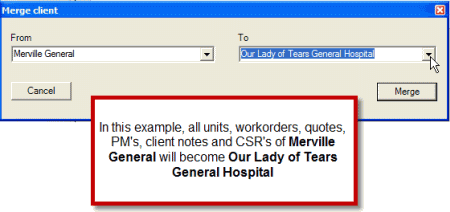
The Client Merger plug-in allows you to "merge" clients - transfer workorders, quotes, etc from one client to another

This plug-in is useful if you have entered duplicates of a client and wish to merge all info to one

The Client Merger plug-in is provided at no charge, and is selected for installation when you run the AyaNova Setup file from the Downloads web page

Refer to the AyaNova Online Help section on the Client Merger utility for more details


Client, Unit, and/or Part Import / Export plugin

Example image opening csv file to import into AyaNova

The importexport.csv file can be used for mass importing or exporting new client records, new part records and new unit records into or out of AyaNova using a CSV text file format

This saves you a lot of time instead of having to manually enter in each record

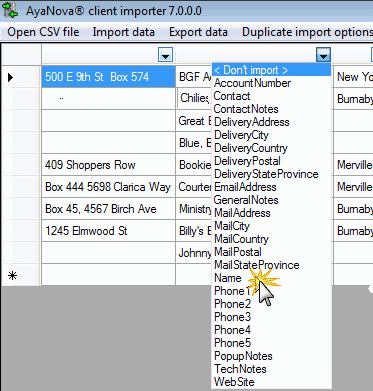
Example image of selecting what field to import into which field in AyaNova

So easy to import - just select which field of your file imports into what field in AyaNova

The importexport.csv plug-in is selected for installation when you run the AyaNova setup file from the Downloads web page

The basic importexport.csv plug-in is provided at no charge - which can import new records into AyaNova, or export all records out of AyaNova.

For the added feature of being able to update existing AyaNova records using the import export plug-in, you only need to purchase one $49.00 license for your database regardless of the number of your AyaNova users that will use this optional add-on plug-in

Example image importing parts into AyaNova

Refer to the AyaNova Online Help section on the Client Import / Export utility for more details

Refer to the AyaNova Online Help section on the Part Import / Export utility for more details

Refer to the AyaNova Online Help section on the Unit Import / Export utility for more details


XTools

Example image of XTools utility AyaNova

The XTools utility gives you the ability to have quick access to other programs, websites, etc while within the AyaNova program

For example, you might want to have a quick link to your Calculator or to the AyaNova Support Forum or to your WBI web page.

The XTools plug-in is provided at no charge, and is installed automatically when you run the AyaNova Setup file from the Downloads web page

Refer to the AyaNova Online Help section on the XTools utility for more details


AyaScript - plug-in for developers

Example image opening csv file to import into AyaNova

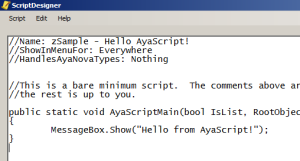
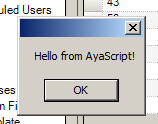
AyaScript provides an editor and runtime environment to develop and execute your own c# code using the AyaNova API and any other resources of the .net framework.

With AyaScript, you can quickly create useful utilities or Add-on's without having to build a full AyaNova plugin or stand alone application and your end users can execute the script from within the AyaNova program without any programming knowledge
Example image opening csv file to import into AyaNova

The AyaScript utility is provided at no charge

Download the AyaScript utility setup file from the Downloads web page

Refer to the AyaScript Help page on the API site for details.