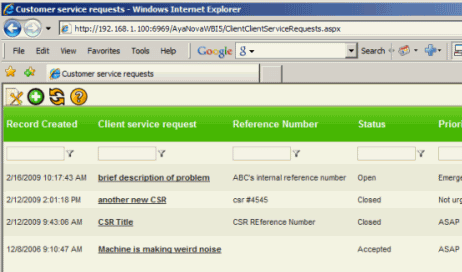
The Customer Service Requests grid
•When you first log into WBI via the URL provided from your service company, you will see a grid that lists all service requests you have made so far sorted in descending order by the date the service request was created.
•If you want to sort by a different column, and/or filter to show only service requests that meet a certain criteria, refer to Filtering & Sorting for details on how to filter this Service Request grid and/or the Workorders Grid
Columns of the Customer Service Request grid
•Record Created - when you created the service request
•Client service request - the text you entered in the Title field when requesting service
•Reference Number - the text you entered in the Reference Number field when requesting service
•Status - the status of the service request
- Open means that this is a new request that you have made that has not been accepted by your service company
- Accepted means that your request has been accepted and a service workorder has been created (see Workorder column)
- Rejected means that your request has been rejected. Contact your service company for details.
- Closed means that the service workorder created from this service request has now been closed (see the Workorder column)
•Priority - the priority (Emergency, Not Urgent, ASAP) that you selected in your service request
•Record Created By - the initials of your AyaNova username you logged into WBI via
•Client - your company name
•Serial Number - the specific unit you selected that needed service in your service request
•Workorder - the workorder created for your service request